Cambio de dominio TFS 2010 y migración de usuarios

Para migrar los usuarios al nuevo dominio:
TFSConfig Accounts /change /AccountType:ApplicationTier /account:cuenta /password:contraseña
El procedimiento se hace cuenta por cuenta.


martes, septiembre 25, 2012
Posted by Carlos

Cómo configurar tu dispositivo Apple para Google Sync

Procedimientos iniciales

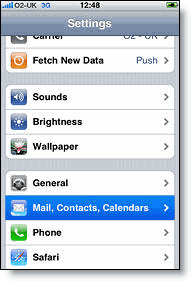
configuración de los contactos, del calendario y del correo en iphone1. Abre la aplicación Ajustes en la pantalla de inicio del dispositivo.
2. Abre Correo, contactos, calendario.
3. Pulsa Añadir cuenta.
4. Selecciona Microsoft Exchange. OS 4.0+ ahora admite múltiples cuentas de Exchange. Sin embargo, si utilizas un dispositivo que no permite añadir una segunda cuenta, también puedes usar CalDAV para sincronizar Google Calendar e IMAP para sincronizar Gmail.

Introduce la información de la cuenta

5. En el campo Correo electrónico, introduce la dirección de correo electrónico completa de tu cuenta de Google. Si utilizas una dirección @googlemail.com, puede que aparezca el mensaje de advertencia "No se puede verificar el certificado" cuando pases al siguiente paso.
6. Deja vacío el campo Dominio.
7. Introduce la dirección de correo electrónico completa de tu cuenta de Google en Nombre de usuario.
8. Introduce la contraseña de tu cuenta de Google en Contraseña.
9. Pulsa Siguiente en la parte superior de la pantalla.
9a. Selecciona Cancelar si aparece el mensaje No es posible verificar el certificado.
10. Cuando aparezca el nuevo campo Servidor, introduce m.google.com.
11. Pulsa Siguiente una vez más en la parte superior de la pantalla.
miércoles, agosto 01, 2012
Posted by Carlos
Tag :

NOTAS PARA UN BLUES

Do
lor por estar contigo en cada cosa. Por no dejar de estar contigo en cada cosa.
Por estar irremediablemente contigo en mí.

Re
cordar que mis monedas no me permiten adquirir. Que mi deseo no es tan poderoso como para taladrar blindajes,ni mi atrevimiento tan hábil como para no hacer saltar la alarma. Recordar que sólo debe mirar los escaparates.

Mi
edo por no llegar a ser, por ni siquiera conseguir estar.

Fa
cilmente lo hacen: clavan sus espinas invisibles, abren la puerta del temor, hacen que renieguen de mí misma cuando menos se espera. Y ni siquiera saber cuántos han sacado copia de mis llaves.

Sol
o he logrado el punzón de la pica, la lágrima del diamante o los caprichos del trébol. Quizá no existan los corazones.
Quizá es que sea imposible elegir.

La
bios sellados, custodios del mejor guardado secreto, del recinto en donde las palabras reanudan
sus batallas silenciosas, sus pacientes y refinados ejercicios de rencor.

Si
crees que es paciencia, resignación, inmunidad o anestesia te equivocas. Es que he procurado cortar todas las margaritas para no tener que interrogarlas.

Fuente 
miércoles, julio 04, 2012
Posted by Carlos
Tag :

Capitulo perdido del Principito


viernes, junio 08, 2012
Posted by Carlos
Tag :

Vida de programador


martes, junio 05, 2012
Posted by Carlos
Tag :

Geeks y tareas repetitivas

viernes, mayo 25, 2012
Posted by Carlos

Crystal reports 2008 x2 Serial

Serial para Crystal reports 2008 x2
CFK0A-Y0TTM2M-00UFAFF-N43M  o CTK0T-5RYZZP6-000MYCJ-4FXT
lunes, abril 16, 2012
Posted by Carlos

How to get assembly version without loading it

The other day I was trying to add a simple autoupdate functionality to a little tool I developed, and I needed to check the version of current assembly against the udpated one. If current assembly was older than the updated one, I needed to substitute the older one with the newer. Plain and simple.
This was my first attempt to achieve this (code has been simplified):
using System.Reflection;
using System.IO;

...

// Get current and updated assemblies
Assembly currentAssembly = Assembly.LoadFile(currentAssemblyPath);
Assembly updatedAssembly = Assembly.LoadFile(updatedAssemblyPath);

AssemblyName currentAssemblyName = currentAssembly.GetName();
AssemblyName updatedAssemblyName = updatedAssembly.GetName();

// Compare both versions
if (updatedAssemblyName.Version.CompareTo(currentAssemblyName.Version) <= 0)
{
    // There's nothing to update
    return;
}

// Update older version
File.Copy(updatedAssemblyPath, currentAssemblyPath, true);
But File.Copy failes because current assembly is in use. Why? Because of Assembly.LoadFile. When we load an assembly no other process (including ours) can change or delete the file because we are using it. The issue is that we can't unload an assembly that we loaded in an AppDomain unless the AppDomain itself gets unloaded. Here I'm using the default AppDomain which will only get unloaded when the application exits. So then I tried creating a new AppDomain, load the assemblies in there and unload the AppDomain afterwards before changing the file. It didn't help either. So...
How can we get the assembly version without loading the assembly? 
The solution is easy:
using System.Reflection;
using System.IO;

...

// Get current and updated assemblies
AssemblyName currentAssemblyName = AssemblyName.GetAssemblyName(currentAssemblyPath);
AssemblyName updatedAssemblyName = AssemblyName.GetAssemblyName(updatedAssemblyPath);

// Compare both versions
if (updatedAssemblyName.Version.CompareTo(currentAssemblyName.Version) <= 0)
{
    // There's nothing to update
    return;
}

// Update older version
File.Copy(updatedAssemblyPath, currentAssemblyPath, true)
 
AssemblyName.GetAssemblyName won't load the assembly, so we can change the file afterwards.  

Fuente
 
miércoles, marzo 21, 2012
Posted by Carlos

Compare two datatable using LINQ Query

Introduction

Compare two datatable having same datatype column using LINQ Query

Using the code

This tips are used to get Mismatched records from datatable1 compared with datatable2 using LINQ Query.  This mismatched records get from another datatable.
 
var qry1 = datatable1.AsEnumerable().Select(a => new { MobileNo = a["ID"].ToString() });
var qry2 = datatable2.AsEnumerable().Select(b => new { MobileNo = b["ID"].ToString() });
var exceptAB = qry1.Except(qry2);
DataTable dtMisMatch = (from a in datatable1.AsEnumerable()
    join ab in exceptAB on a["ID"].ToString() equals ab.MobileNo
    select a).CopyToDataTable(); 
 
Fuente 
lunes, marzo 12, 2012
Posted by Carlos

Adding simple trigger-based auditing to your SQL Server database

Fuente
How do you track changes to data in your database? There are a variety of supported auditing methods for SQL Server, including comprehensive C2 security auditing, but what do you do if you're solving a business rather than a security problem, and you're interested in tracking the following kinds of information:

  • What data has been updated recently
  • Which tables have not been updated recently
  • Who modified the price of Steeleye Stout to $20 / unit, and when did they do it?
  • What was the unit price for Steeleye Stout before Jon monkeyed with it?

There are a number of ways to design this into your solution from the start, for example:

  • The application is designed so that all changes are logged
  • All data changes go through a data access layer which logs all changes
  • The database is constructed in such a way that logging information is included in each table, perhaps set via a trigger

What if we're not starting from scratch?


But what do you do if you need to add lightweight auditing to an existing solution, in which data can be modified via a variety of direct access methods? When I ran into that challenge, I decided to use Nigel Rivett's SQL Server Auditing triggers. I read about some concern with the performance impact, but this database wasn't forecasted to have a high update rate. Nigel's script works by adding a trigger for INSERT, UPDATE, and DELETE on a single table. The trigger catches data changes, then saves out the information (such as table name, the primary key values, the column name that was altered, and the before and after values for that column) to an Audit table.

I needed to track every table in the database, though, and I expected the database schema to continue to change. I was able to generalize the solution a bit, because the database convention didn't use any no compound primary keys. I created the script listed below, which loops through all tables in the database with the exception of the Audit table, of course, since auditing changes to the audit table is both unnecessary and recursive. I'm also skipping sysdiagrams; you could include any other tables you don't want to track to that list as well.

The nice thing about the script I'm including below is that you can run it after making some schema changes and it will make sure that all newly added tables are included in the change tracking / audit, too.

Here's an example of what you'd see in the audit table for an Update followed by an Insert. Notice that the Update shows type U and a single column updated, while the Insert (type I) shows all columns added, one on each row:

Sample Audit Data

While this information is pretty unstructured, it's not difficult to run some useful reports. For instance, we can easily find things like

  • which tables were updated recently
  • which tables have not been updated in the past year
  • which tables have never been updated
  • all changes made by a specific user in a time period
  • most active tables in a time period

While it's not as easy, it's possible to backtrack from the current state to determine the state of a row in a table at a certain point in time. It's generally possible to dig out the state of an entire table at a point in time, but a change table isn't a good a fit for temporal data tracking - the right solution there is to start adding Modified By and Modified On columns to the required tables.

Note that we're only tracking data changes here. If you'd like to track schema changes, take a look at SQL Server 2005's DDL triggers.

Enough talking, give us the script!


Sure. I'll repeat that there are some disclaimers to the approach -  performance, it'll only track changes to tables with a primary key, etc. If you want to know more about the trigger itself, I'd recommend starting with Nigel's article. However, it worked great for our project.

IF NOT EXISTS(SELECT * FROM INFORMATION_SCHEMA.TABLES WHERE TABLE_NAME= 'tAuditoria')
CREATE TABLE tAuditoria
(
tIdAuditoria [int]IDENTITY(1,1) NOT NULL,
Type char(1),
TableName varchar(128),
PrimaryKeyField varchar(1000),
PrimaryKeyValue varchar(1000),
FieldName varchar(128),
OldValue varchar(1000),
NewValue varchar(1000),
UpdateDate datetime DEFAULT (GetDate()),
UserName varchar(128)
)
GO
DECLARE
@sql varchar(8000), @TABLE_NAME sysname
SET NOCOUNT ON
SELECT @TABLE_NAME= MIN(TABLE_NAME)
FROM INFORMATION_SCHEMA.Tables
WHERE
TABLE_TYPE= 'BASE TABLE'
ANDTABLE_NAME!= 'sysdiagrams'
AND TABLE_NAME!= 'tAuditoria'
WHILE @TABLE_NAME IS NOT NULL
BEGIN
EXEC('IF OBJECT_ID (''' + @TABLE_NAME+ '_ChangeTracking'', ''TR'') IS NOT NULL DROP TRIGGER ' + @TABLE_NAME+ '_ChangeTracking')
SELECT @sql =
'
create trigger ' + @TABLE_NAME+ '_ChangeTracking on ' + @TABLE_NAME+ ' for insert, update, delete
as
declare @bit int ,
@field int ,
@maxfield int ,
@char int ,
@fieldname varchar(128) ,
@TableName varchar(128) ,
@PKCols varchar(1000) ,
@sql varchar(2000),
@UpdateDate varchar(21) ,
@UserName varchar(128) ,
@Type char(1) ,
@PKFieldSelect varchar(1000),
@PKValueSelect varchar(1000)
select @TableName = '''
+ @TABLE_NAME+ '''
-- date and user
select @UserName = system_user ,
@UpdateDate = convert(varchar(8), getdate(), 112) + '' '' + convert(varchar(12), getdate(), 114)
-- Action
if exists (select * from inserted)
if exists (select * from deleted)
select @Type = ''U''
else
select @Type = ''I''
else
select @Type = ''D''
-- get list of columns
select * into #ins from inserted
select * into #del from deleted
-- Get primary key columns for full outer join
select@PKCols = coalesce(@PKCols + '' and'', '' on'') + '' i.'' + c.COLUMN_NAME + '' = d.'' + c.COLUMN_NAME
fromINFORMATION_SCHEMA.TABLE_CONSTRAINTS pk ,
INFORMATION_SCHEMA.KEY_COLUMN_USAGE c
where pk.TABLE_NAME = @TableName
andCONSTRAINT_TYPE = ''PRIMARY KEY''
andc.TABLE_NAME = pk.TABLE_NAME
andc.CONSTRAINT_NAME = pk.CONSTRAINT_NAME
-- Get primary key fields select for insert
select @PKFieldSelect = coalesce(@PKFieldSelect+''+'','''') + '''''''' + COLUMN_NAME + ''''''''
fromINFORMATION_SCHEMA.TABLE_CONSTRAINTS pk ,
INFORMATION_SCHEMA.KEY_COLUMN_USAGE c
where pk.TABLE_NAME = @TableName
andCONSTRAINT_TYPE = ''PRIMARY KEY''
andc.TABLE_NAME = pk.TABLE_NAME
andc.CONSTRAINT_NAME = pk.CONSTRAINT_NAME
select @PKValueSelect = coalesce(@PKValueSelect+''+'','''') + ''convert(varchar(100), coalesce(i.'' + COLUMN_NAME + '',d.'' + COLUMN_NAME + ''))''
from INFORMATION_SCHEMA.TABLE_CONSTRAINTS pk ,
INFORMATION_SCHEMA.KEY_COLUMN_USAGE c
where pk.TABLE_NAME = @TableName
and CONSTRAINT_TYPE = ''PRIMARY KEY''
and c.TABLE_NAME = pk.TABLE_NAME
and c.CONSTRAINT_NAME = pk.CONSTRAINT_NAME
if @PKCols is null
begin
raiserror(''no PK on table %s'', 16, -1, @TableName)
return
end
select @field = 0, @maxfield = max(ORDINAL_POSITION) from INFORMATION_SCHEMA.COLUMNS where TABLE_NAME = @TableName
while @field < @maxfield
begin
select @field = min(ORDINAL_POSITION) from INFORMATION_SCHEMA.COLUMNS where TABLE_NAME = @TableName and ORDINAL_POSITION > @field
select @bit = (@field - 1 )% 8 + 1
select @bit = power(2,@bit - 1)
select @char = ((@field - 1) / 8) + 1
if substring(COLUMNS_UPDATED(),@char, 1) & @bit > 0 or @Type in (''I'',''D'')
begin
select @fieldname = COLUMN_NAME from INFORMATION_SCHEMA.COLUMNS where TABLE_NAME = @TableName and ORDINAL_POSITION = @field
select @sql = ''insert tAuditoria (Type, TableName, PrimaryKeyField, PrimaryKeyValue, FieldName, OldValue, NewValue, UpdateDate, UserName)''
select @sql = @sql + '' select '''''' + @Type + ''''''''
select @sql = @sql + '','''''' + @TableName + ''''''''
select @sql = @sql + '','' + @PKFieldSelect
select @sql = @sql + '','' + @PKValueSelect
select @sql = @sql + '','''''' + @fieldname + ''''''''
select @sql = @sql + '',convert(varchar(1000),d.'' + @fieldname + '')''
select @sql = @sql + '',convert(varchar(1000),i.'' + @fieldname + '')''
select @sql = @sql + '','''''' + @UpdateDate + ''''''''
select @sql = @sql + '','''''' + @UserName + ''''''''
select @sql = @sql + '' from #ins i full outer join #del d''
select @sql = @sql + @PKCols
select @sql = @sql + '' where i.'' + @fieldname + '' <> d.'' + @fieldname
select @sql = @sql + '' or (i.'' + @fieldname + '' is null and d.'' + @fieldname + '' is not null)''
select @sql = @sql + '' or (i.'' + @fieldname + '' is not null and d.'' + @fieldname + '' is null)''
exec (@sql)
end
end
'
SELECT @sql
-- EXEC(@sql)
PRINT (@sql)
SELECT @TABLE_NAME= MIN(TABLE_NAME) FROM INFORMATION_SCHEMA.Tables
WHERE TABLE_NAME> @TABLE_NAME
AND TABLE_TYPE= 'BASE TABLE'
AND TABLE_NAME!= 'sysdiagrams'
AND TABLE_NAME!= 'tAuditoria'
END
miércoles, febrero 22, 2012
Posted by Carlos

DataTable - Adding, Modifying, Deleting, Filtering, Sorting rows & Reading/Writing from/to Xml

Creating a DataTable
To create a DataTable, you need to use System.Data namespace, generally when you create a new class or page, it is included by default by the Visual Studio. Lets write following code to create a DataTable object. Here, I have pased a string as the DataTable name while creating DataTable object.
// instantiate DataTableDataTable dTable = new DataTable("Dynamically_Generated");
Creating Columns in the DataTable
To create column in the DataTable, you need to use DataColumn object. Instantiate the DataColumn object and pass column name and its data type as parameter. Then call add method of DataTable column and pass the DataColumn object as parameter.
// create columns for the DataTable
DataColumn auto = new DataColumn("AutoID", typeof(System.Int32));
dTable.Columns.Add(auto);
// create another column
DataColumn name = new DataColumn("Name", typeof(string));
dTable.Columns.Add(name);
// create one more column
DataColumn address = new DataColumn("Address", typeof(string));
dTable.Columns.Add(address);
Specifying AutoIncrement column in the DataTable
To specify a column as AutoIncrement (naturally it should be an integer type of field only), you need to set some properties of the column like AutoIncrement, AutoIncrementSeed. See the code below, here I am setting the first column "AutoID" as autoincrement field. Whenever a new row will be added its value will automatically increase by 1 as I am specified AutoIncrementSeed value as 1.
// specify it as auto increment field
auto.AutoIncrement = true;
auto.AutoIncrementSeed = 1;
auto.ReadOnly = true;
If you want a particular column to be a unique column ie. you don't want duplicate records into that column, then set its Unique property to true like below.
auto.Unique = true;
Specifying Primary Key column in the DataTable
To set the primary key column in the DataTable, you need to create arrays of column and store column you want as primary key for the DataTable and set its PrimaryKey property to the column arrays. See the code below.
// create primary key on this fieldDataColumn[] pK = new DataColumn[1];
pK[0] = auto;
dTable.PrimaryKey = pK;
Till now we have created the DataTable, now lets populate the DataTable with some data.
Populating data into DataTable
There are two ways to populate DataTable.
Using DataRow object
Look at the code below, I have created a DataRow object above the loop and I am assiging its value to the dTable.NewRow() inside the loop. After specifying columns value, I am adding that row to the DataTable using dTable.Rows.Add method.
// populate the DataTable using DataRow objectDataRow row = null;
for (int i = 0; i < 5; i++)
{
row = dTable.NewRow(); row["AutoID"] = i + 1; row["Name"] = i + " - Ram"; row["Address"] = "Ram Nagar, India - " + i; dTable.Rows.Add(row);
}
Instead of using the column name, you can use ColumnIndex too, however it is not suggested as you might want to add a column in the mid of the table then you will need to change your code wherever you have specified the index of the column. Same applies while reading or writing values into Database column.
Asiging the value of column using Arrays
In following code, I have specified the values of every column as the array separated by comma (,) in the Add method of the dTable.Rows.
// manually adding rows using array of valuesdTable.Rows.Add(6, "Manual Data - 1", "Manual Address - 1, USA");
dTable.Rows.Add(7, "Manual Data - 2", "Manual Address - 2, USA");
Modifying data into DataTable
Modifying Row Data
To edit the data of the row, sets its column value using row index or by specifying the column name. In below example, I am updating the 3rd row of the DataTable as I have specified the row index as 2 (dTable.Rows[2]).
// modify certain values into the DataTabledTable.Rows[2]["AutoID"] = 20;
dTable.Rows[2]["Name"] = "Modified";
dTable.Rows[2]["Address"] = "Modified Address";
dTable.AcceptChanges();
Deleting Row
To delete a row into DataTable, call the rows.Delete() method followed by AcceptChanges() method. AcceptChanges() method commits all the changes made by you to the DataTable. Here Row[1] is the index of the row, in this case 2nd row will be deleted as in collection (here rows collection) count start from 0.
// Delete rowdTable.Rows[1].Delete();
dTable.AcceptChanges();

Filtering data from DataTable
To filter records from the DataTable, use Select method and pass necessary filter expression. In below code, the 1st line will simply filter all rows whose AutoID value is greater than 5. The 2nd line of the code filters the DataTable whose AutoID value is greater than 5 after sorting it.
DataRow[] rows = dTable.Select(" AutoID > 5");
DataRow[] rows1 = dTable.Select(" AutoID > 5", "AuotID ASC");
Note that Select method of the DataTable returns the array of rows that matche the filter expression. If you want to loop through all the filtered rows, you can use foreach loop as shown below. In this code, I am adding all the filtered rows into another DataTable.
foreach (DataRow thisRow in rows)
{
// add values into the datatable dTable1.Rows.Add(thisRow.ItemArray);
}
Working with Aggregate functions (Updated on 18-Nov-08)
We can use almost all aggregate functions with DataTable, however the syntax is bit different than standard SQL.
Suppose we need to get the maximum value of a particular column, we can get it in the following way.
DataRow[] rows22 = dTable.Select("AutoID = max(AutoID)");
string str = "MaxAutoID: " + rows22[0]["AutoID"].ToString();
To get the sum of a particular column, we can use Compute method of the DataTable. Compute method of the DataTable takes two argument. The first argument is the expression to compute and second is the filter to limit the rows that evaluate in the expression. If we don't want any filteration (if we need only the sum of the AutoID column for all rows), we can leave the second parameter as blank ("").
object objSum = dTable.Compute("sum(AutoID)", "AutoID > 7");
string sum = "Sum: " + objSum.ToString();
// To get sum of AutoID for all rows of the DataTable
object objSum = dTable.Compute("sum(AutoID)", "");

Sorting data of DataTable
Oops !. There is no direct way of sorting DataTable rows like filtering (Select method to filter DataRows).
There are two ways you can do this.
Using DataView
See the code below. I have created a DataView object by passing my DataTable as parameter, so my DataView will have all the data of the DataTable. Now, simply call the Sort method of the DataView and pass the sort expression. Your DataView object have sorted records now, You can either directly specify the Source of the Data controls object like GridView, DataList to bind the data or if you need to loop through its data you can use ForEach loop as below.
// Sorting DataTableDataView dataView = new DataView(dTable);
dataView.Sort = " AutoID DESC, Name DESC";
foreach (DataRowView view in dataView)
{
Response.Write(view["Address"].ToString());
}
Using DataTable.Select() method
Yes, you can sort all the rows using Select method too provided you have not specified any filter expression. If you will specify the filter expression, ofcourse your rows will be sorted but filter will also be applied. A small drawback of this way of sorting is that it will return array of DataRows as descibed earlier so if you are planning to bind it to the Data controls like GridView or DataList you will have for form a DataTable by looping through because directly binding arrays of rows to the Data controls will not give desired results.
DataRow[] rows = dTable.Select("", "AutoID DESC");
Writing and Reading XmlSchema of the DataTable
If you need XmlSchema of the DataTabe, you can use WriteXmlSchema to write and ReadXmlSchema to read it. There are several overloads methods of both methods and you can pass filename, stream, TextReader, XmlReader etc. as the parameter. In this code, the schema will be written to the .xml file and will be read from there.
// creating schema definition of the DataTabledTable.WriteXmlSchema(Server.MapPath("~/DataTableSchema.xml"));
// Reading XmlSchema from the xml file we just created
DataTable dTableXmlSchema = new DataTable();
dTableXmlSchema.ReadXmlSchema(Server.MapPath("~/DataTableSchema.xml"));
Reading/Writing from/to Xml
If you have a scenario, where you need to write the data of the DataTable into xml format, you can use WriteXml method of the DataTable. Note that WriteXml method will not work if you will not specify the name of the DataTable object while creating it. Look at the first code block above, I have passed "Dynamically_Generated" string while creating the instance of the DataTable. If you will not specify the name of the DataTable then you will get error as WriteXml method will not be able to serialize the data without it.
// Note: In order to write the DataTable into XML, // you must define the name of the DataTable while creating it
// Also if you are planning to read back this XML into DataTable, you should define the XmlWriteMode.WriteSchema too 
// Otherwise ReadXml method will not understand simple xml file 
dTable.WriteXml(Server.MapPath("~/DataTable.xml"), XmlWriteMode.WriteSchema);
// Loading Data from XML into DataTable
DataTable dTableXml = new DataTable();
dTableXml.ReadXml(Server.MapPath("~/DataTable.xml"));
If you are planning to read the xml you have just created into the DataTable sometime later then you need to specify XmlWriteMode.WriteSchema too as the 2nd parameter while calling WriteXml method of the DataTable otherwise normally WriteXml method doesn't write schema of the DataTable. In the abscence of the schema, you will get error (DataTable does not support schema inference from Xml) while calling ReadXml method of the DataTable.

Fuente
lunes, febrero 13, 2012
Posted by Carlos
Tag :

SharePoint 2010 PDF Icon

Sharepoint no tiene por Default el Icono de los archivos .PDF que subimos a las bibliotecas o adjuntamos en elementos de Listas…

image

Asi que el camino mas logico es ver de que la modalidad de carga, no se modifique en 2010, como sabemos, la carpeta de SharePoint 2010 es ahora “14”

image 

Dentro de la carpeta TEMPLATE, tenemos la carpeta XML donde se encuentra el Archivo a Editar, DOCICON.XML

image

Adicionamos una linea haciendo referencia al icono de .PDF

image

Copiamos el archivo en la carpeta de Imagenes (Descargamos un icono en formato .GIF y de 16x16 pixeles para que concuerde con los demas iconos que tenemos en SharePoint)

image

Luego, reiniciamos el IIS para que tome los datos, y listo…
martes, enero 17, 2012
Posted by Carlos

Cuestion de amores

Bob Marley dijo: '' Puedes no ser su primero, su ultimo o su único. Ella amo antes y puede amar de nuevo. Pero si ella te ama ahora, Que otra cosa importa? Ella no es perfecta, tú tampoco lo eres, y ustedes dos nunca serán perfectos. Pero si ella puede hacerte reír al menos una vez, te hace pensar dos veces, si admite ser humana y cometer errores, no la dejes ir y dale lo mejor de ti. Ella no va a ... recitarte poesía, no está pensando en ti en todo momento, pero te dará una parte de ella que sabe que podrías romper, su corazón.. No la lastimes, no la cambies, y no esperes de ella más de lo que puede darte. No analices. Sonríe cuando te haga feliz, grita cuando te haga enojar y extráñala cuando no esté. Ama con todo tu ser cuando recibas su amor. Porque no existen las chicas perfectas, pero siempre habrá una chica que es perfecta para ti.. ''
martes, diciembre 06, 2011
Posted by Carlos
Tag :

Siempre es preciso saber

Siempre es preciso saber cuándo se acaba una etapa de la vida. Si insistes en permanecer en ella más allá del tiempo necesario, pierdes la alegría y el sentido del resto. Siempre es necesario cerrar ciertas puertas con una llave, que luego debes olvidar...
martes, noviembre 29, 2011
Posted by Carlos
Tag :

Ordering Interger values stored in Varchar column

I have seen many newbies asking "How do I sort the numbers stored in varchar columns?"
Here are some methods
declare @t table(data varchar(15))
insert into @tselect '6134' union allselect '144' union allselect '7345' union allselect '109812' union allselect '100074'union allselect '1290' union allselect '45764'
--Method 1
select data from @torder by cast(data as int)
--Method 2
select data from @torder by data+0
--Method 3
select data from @torder by len(data),data
--Method 4
select data from @torder by replace(str(data),' ','0')
--Method 5
select data from @tgroup by dataorder by replicate('0',len(data)),data
--Method 6

select data from @torder by replicate('0',(select max(len(data+0)) from @t)-len(data))+data
--Method 7 select data from @tcross join
(
        select len(max(data+0)) as ln from @t) as torder by replicate('0',ln-len(data))+data
jueves, octubre 13, 2011
Posted by Carlos

Validar cero SQL

IsNull( Nullif(valor,0), 1)
miércoles, octubre 05, 2011
Posted by Carlos

DDAY.UPDATE error creating bootstrap

************** Exception Text ************** System.TypeLoadException: Could not load type 'System.Runtime.Versioning.TargetFrameworkAttribute' from assembly 'mscorlib, Version=2.0.0.0, Culture=neutral, PublicKeyToken=b77a5c561934e089'.

Bueno en mi caso funciono, cambiando la clase Compiler.cs
de: foreach (object obj in assembly.GetCustomAttributes(true)){}
a: foreach (object obj in assembly.GetCustomAttributesData()){}

Aún mas fácil , solo se debe cambiar el proyecto para que utilice a Taget Framework 4
miércoles, agosto 31, 2011
Posted by Carlos

Solución – Error al Instalar SQL Server 2008 R2


Error: “SQL server setup media does not support the language of the OS or does not have ENU localized files. Use the matching language-specific SQL Server media or change the OS locale through Control Panel.”
Solución:
  1. Ir al Panel de Control
  2. Configuración regional y de idioma
  3. Formatos: Seleccionar Español( España)
  4. Aplicar Cambios
  5. clip_image002
  6. Ejecutamos la Instalación de SQL SERVER 2008 R2
  7. Una vez instalado SQL Server podemos regresar a nuestra configuración anterior
  8. Listo! , Todo solucionado
jueves, julio 28, 2011
Posted by Carlos

Populares!

- Copyright © - Oubliette - -Metrominimalist- Powered by Blogger - Designed by Johanes Djogan -